Eufy Doorbell Camera: The Subscription-Free Smart Security Solution
Have you ever wished you could see who’s at your door without getting up from the couch? Or check if that package you’ve been waiting for finally arrived while you’re away? In today’s world, home security isn’t just about locks and alarms anymore—it’s about staying connected to your home, no matter where you are.
We’ve all been there: the doorbell rings at the most inconvenient time, or worse, we miss an important delivery because we stepped out for a quick errand. That’s where smart doorbell cameras come in, and Eufy has positioned itself as one of the most compelling options on the market. But with so many choices available, is a Eufy doorbell camera the right pick for your home? Let’s find out.
Table of Contents
What Are Eufy Doorbell Cameras?
When I first started researching smart doorbell options, the sea of choices was overwhelming. Ring, Nest, Arlo—the list goes on. But Eufy kept popping up as the subscription-free alternative that doesn’t compromise on quality or features.
Eufy is a smart home brand owned by Anker Innovations, a Chinese company known for producing reliable consumer electronics and accessories. If you’ve ever purchased a portable charger or wireless earbuds, chances are you’ve come across Anker products before. Their Eufy sub-brand focuses specifically on smart home devices, with doorbell cameras being one of their standout offerings.
What makes Eufy doorbell cameras special is their focus on providing premium features without the recurring costs that plague many competitors. Their product lineup includes both battery-powered and wired options, giving homeowners flexibility regardless of their existing setup.

Eufy’s doorbell cameras aren’t just about answering the door remotely—they’re complete security solutions that can detect package deliveries, distinguish between humans and other moving objects, and store footage locally rather than in the cloud (more on that important privacy feature later).
No Subscription Required: The Eufy Advantage
Let’s cut to the chase: one of the biggest selling points of Eufy doorbell cameras is that they don’t require a monthly subscription to access basic or even advanced features.
When I was comparing doorbell cameras, I was shocked to discover how many competitors lock essential features behind subscription paywalls. Want to review footage from yesterday? That’ll be $3-$10 per month with Ring or Nest. Want to save clips for more than 24 hours? Better pay up.
With Eufy, what you see is what you get:
- Local storage of video footage (typically 16GB-128GB depending on the model)
- Human detection and motion alerts
- Activity zones to reduce false alarms
- Facial recognition on some models
- Full access to historical footage without time limits
All this comes with zero monthly fees. Zero. Nada. Zilch.
Let’s put that in perspective with a simple calculation: a Ring or Nest doorbell might cost you around $100-300 upfront, but then you’re looking at $30-$120 per year in subscription fees. Over a five-year period, that’s an additional $150-$600 on top of your initial purchase.
With Eufy, your only cost is the upfront purchase price, which typically ranges from $100-$250 depending on the model and whether you need additional equipment like a HomeBase.
This subscription-free approach doesn’t just save you money—it gives you peace of mind that your security device won’t suddenly become less useful if you decide to cancel a subscription down the road.
Eufy Doorbell Camera Features
What exactly can you expect from a Eufy doorbell camera? Let’s break down the key features that make these devices stand out from the crowd.
Video Quality That Impresses
Most Eufy doorbell cameras offer 2K resolution (2560 x 1920 pixels), which is noticeably sharper than the 1080p resolution found on many competing models. This extra detail can make all the difference when you need to identify someone’s face or read a package label.
I was particularly impressed with how Eufy handles high-contrast lighting situations, like when the sun is behind your visitor. The HDR (High Dynamic Range) capability helps balance the image so faces aren’t just dark silhouettes.
Motion Detection: Smart and Customizable
False alerts can be the bane of any security camera owner’s existence. No one wants their phone buzzing every time a car drives by or a leaf blows across the yard.
Eufy’s AI-powered detection can distinguish between humans and other moving objects, dramatically reducing nuisance alerts. Most models can detect motion up to 15-20 feet away, which is perfect for average-sized porches and entryways.
You can also set up activity zones, telling your camera which areas to monitor and which to ignore. Living on a busy street? Just exclude the sidewalk area from your detection zone, and you’ll only get alerts when someone actually approaches your door.
Night Vision That Doesn’t Miss a Thing
Home security doesn’t clock out when the sun goes down, and neither does Eufy’s performance. The infrared night vision can clearly capture visitors and activity up to 20 feet away in complete darkness.
Some models even offer color night vision thanks to a small spotlight that activates when motion is detected. This can be particularly helpful for identifying clothing colors or other details that might be lost in traditional black-and-white infrared footage.
Two-Way Audio: Clear Conversations
Whether you’re giving delivery instructions or greeting a visitor remotely, clear audio is essential. Eufy doorbell cameras feature noise-cancellation technology that helps filter out background noise, making conversations clearer even on busy streets.
I’ve found the microphone and speaker quality to be surprisingly good, with minimal delay during conversations. This makes it feel more like a natural interaction rather than the awkward walkie-talkie experience some cheaper doorbell cameras deliver.
Storage: Your Footage, Your Property
Unlike cloud-dependent competitors, Eufy stores your video footage locally—either in the doorbell itself or on the Eufy HomeBase, depending on the model. This local storage approach offers several advantages:
- No ongoing costs for cloud storage
- Faster access to your footage
- Your videos remain accessible even if your internet goes down
- Enhanced privacy since your footage isn’t uploaded to third-party servers
Most models come with 16GB-128GB of storage, which typically provides weeks of event recordings before older footage gets overwritten.
Installation and Compatibility
Setting up a smart doorbell shouldn’t require an engineering degree, and Eufy has done a good job of making installation straightforward for most homeowners.
Wired vs. Wireless: Choose Your Style
Eufy offers both wired and battery-powered options to suit different homes and preferences:
Battery-Powered Models:
- Easier installation with no wiring required
- Can be placed anywhere within Wi-Fi range
- Typically last 3-6 months per charge
- Require occasional recharging
Wired Models:
- Connect to existing doorbell wiring (16-24V AC)
- No batteries to recharge
- Often slightly slimmer design
- Can usually work with existing mechanical chimes
I personally prefer the wired models for the set-it-and-forget-it approach, but the battery-powered options offer incredible flexibility, especially for renters or homes without existing doorbell wiring.
HomeBase: Do You Need It?
This is one of the most common questions about Eufy doorbells: do you need the HomeBase unit that comes with some models?
The answer depends on which model you choose:
- Battery-powered wireless doorbells typically require the HomeBase for video storage and as a connection hub
- Wired doorbells usually store footage within the device itself and connect directly to your home Wi-Fi
The HomeBase isn’t just storage, though—it also serves as a chime and can connect multiple Eufy security devices into one system. It includes a backup battery that keeps your security system running during power outages and even features a surprisingly loud siren that can be triggered manually or automatically.
If you’re planning to expand your home security system beyond just a doorbell camera, the HomeBase becomes even more valuable as a central hub for the entire Eufy ecosystem.
Existing Chime Compatibility
If you’re upgrading from a traditional doorbell, you might wonder if your existing chime will still work with a Eufy doorbell camera.
For wired models, the answer is generally yes—most Eufy wired doorbells are compatible with existing mechanical chimes (the kind with a physical ding-dong sound). They typically aren’t compatible with digital chimes, however.
Battery-powered models don’t connect to your existing chime, but they come with alternative notification options:
- The HomeBase unit serves as a wireless chime
- Your phone receives push notifications
- You can purchase separate wireless chimes that work with the Eufy system
Internet Dependency: What Happens Offline?
While Eufy doorbell cameras rely on Wi-Fi for remote access and alerts, they don’t completely stop functioning if your internet goes down:
- Local recording continues (though you can’t view it remotely until connectivity is restored)
- The doorbell button still works to trigger a chime
- Some models can store a limited buffer of recent events to upload once connectivity returns
This partial offline functionality gives Eufy an edge over completely cloud-dependent systems that become glorified paperweights during internet outages.
Battery Life and Performance
For battery-powered models, one of the biggest concerns is how often you’ll need to recharge. Nobody wants to climb a ladder every few weeks to maintain their security system.
Real-World Battery Life
Eufy advertises 3-6 months of battery life for most of their wireless doorbell cameras, but as with all battery-powered devices, your mileage may vary depending on usage patterns.
Factors that affect battery life include:
- How many visitors and deliveries you receive
- Motion detection frequency
- Live view usage (checking the camera manually)
- Environmental temperatures (extreme cold can reduce battery performance)
- Video quality settings
In my experience and based on user reports, most people average about 3-4 months between charges under normal use conditions.
Charging Options
When it’s time to recharge, you have two main options:
- Remove the entire doorbell unit and plug it in via USB (typically takes 4-6 hours for a full charge)
- Purchase a second battery to swap in while charging the depleted one (available for some models)
Some users opt to purchase a solar charger accessory, which can extend battery life indefinitely in locations with adequate sunlight.
Weather Resistance
Doorbell cameras live outdoors, facing whatever Mother Nature throws their way. Eufy designs their doorbell cameras with IP65 weather resistance, meaning they’re protected against dust and low-pressure water jets from any direction.
In practical terms, they handle rain, snow, and temperature extremes quite well. Most models operate reliably in temperatures ranging from -4°F to 122°F (-20°C to 50°C), making them suitable for most climates across the United States.
Eufy vs. Major Competitors
The smart doorbell market is crowded with options, so how does Eufy stack up against the biggest names in the business?
Eufy vs. Ring
Ring, owned by Amazon, is perhaps the best-known doorbell camera brand, but that doesn’t automatically make it superior, as independent comparisons from CNET have shown.
Subscription Model:
- Ring requires a subscription ($3-$10/month) to record and save video
- Eufy stores video locally with no subscription fees
Privacy:
- Ring has faced criticism over its partnerships with police departments and data sharing practices
- Eufy emphasizes local storage and user privacy (though they had their own security controversy in 2022, which they’ve since addressed)
Integration:
- Ring integrates seamlessly with Amazon Alexa devices
- Eufy works with both Alexa and Google Assistant, offering more flexibility
Video Quality:
- Eufy typically offers 2K resolution
- Most Ring models feature 1080p resolution
For most users, the decision between Eufy and Ring comes down to whether you’re willing to pay ongoing subscription fees for cloud storage or prefer Eufy’s one-time purchase approach.
Eufy vs. Arlo
Arlo’s doorbell cameras offer excellent video quality and smart features, making them closer competitors to Eufy in terms of performance.
Subscription Requirements:
- Arlo requires a subscription for cloud recording and advanced features
- Eufy includes all features with no subscription
Video Quality:
- Both offer excellent video quality (2K resolution on most models)
- Arlo may have a slight edge in night vision quality
Smart Detection:
- Both offer AI-powered person, package, and animal detection
- Arlo’s detection may be slightly more accurate in edge cases
Price:
- Eufy typically offers better value when factoring in the lack of subscription fees
Eufy vs. Nest
Google’s Nest doorbell cameras offer tight integration with the Google Home ecosystem but at a premium price.
Hardware Cost:
- Nest doorbells typically cost more upfront than comparable Eufy models
- Both offer wired and battery options
Subscriptions:
- Nest requires a Google Nest Aware subscription ($6-$12/month) for recording and advanced features
- Eufy includes all features and local recording at no additional cost
Smart Home Integration:
- Nest integrates seamlessly with Google Home devices
- Eufy works with Google Assistant and Alexa, but integration isn’t quite as deep
Facial Recognition:
- Both offer facial recognition, but Nest’s is generally considered more accurate
- Eufy’s facial recognition works offline without sending data to the cloud
Comparison Table: Eufy vs. Competitors
| Feature | Eufy | Ring | Arlo | Nest |
|---|---|---|---|---|
| Upfront Cost | $100-$250 | $100-$250 | $150-$250 | $180-$280 |
| Monthly Fees | None | $3-$10 | $3-$15 | $6-$12 |
| Video Quality | 2K | 1080p | 2K | 1080p-HDR |
| Local Storage | Yes | No | Limited | No |
| Cloud Storage | Optional | Subscription only | Subscription only | Subscription only |
| Battery Life | 3-6 months | 2-6 months | 3-6 months | 2-6 months |
| Smart Home | Alexa, Google | Alexa, limited Google | Alexa, Google, HomeKit | Google, limited Alexa |
| Privacy Focus | High | Low | Medium | Low |
Security and Privacy Considerations
Smart home devices inevitably raise questions about security and privacy. Let’s address some common concerns about Eufy doorbell cameras.
Past Security Issues
In late 2022, Eufy faced criticism when security researchers discovered vulnerabilities that potentially allowed unauthorized access to camera feeds. The company addressed these issues through firmware updates and enhanced their security practices.
While concerning, it’s worth noting that nearly every major smart home company has faced similar security challenges at some point. What matters is how transparently they address them and what steps they take to prevent future issues.
Current Security Measures
Today’s Eufy doorbell cameras include several security features:
- End-to-end encryption for video transmission
- Local storage of footage (not in the cloud unless you opt in)
- Two-factor authentication for account access
- Regular security updates
For additional security, I recommend:
- Using a strong, unique password for your Eufy account
- Enabling two-factor authentication
- Keeping your doorbell camera and HomeBase firmware updated
- Setting up a separate IoT network on your router if possible, as recommended by security experts
Data Storage and Privacy
One of Eufy’s biggest selling points is its approach to data privacy. Unlike many competitors, Eufy:
- Stores your footage locally by default
- Doesn’t require cloud storage
- Processes AI detection locally on device or HomeBase
- Doesn’t share your data with third parties (according to their privacy policy)
This privacy-focused approach is refreshing in an era where many tech companies seem to view user data as a product to be monetized.
Common Questions Answered
Let’s address some of the most frequently asked questions about Eufy doorbell cameras:
Does Eufy work without internet?
Partially. Without internet:
- The physical doorbell button still works
- Local recording continues
- You can’t access live view or receive notifications
- Stored footage remains accessible once internet is restored
For more details on offline functionality, you can check Eufy’s official support documentation.
Can Eufy record continuously?
Most Eufy doorbell cameras are designed for event-based recording (when motion is detected or someone presses the button). However, some wired models can be set to record continuously if connected to a NVR (Network Video Recorder) system.
The standard 16GB-128GB storage is generally sufficient for 2-4 weeks of event-based recordings but would only capture 1-3 days of continuous footage.
Can I use Eufy without the app?
The Eufy Security app is required for initial setup and accessing most features. However, once set up:
- The doorbell button will still ring your chime
- Some models can be integrated with smart displays like Echo Show or Google Nest Hub
- Certain functions can be controlled via voice assistants
Do you need HomeBase for an Eufy doorbell?
It depends on the model:
- Battery-powered wireless models typically require the HomeBase
- Wired models usually don’t require the HomeBase
The HomeBase provides additional functionality like local storage, a backup power source, and a built-in siren, so it’s worth considering even for models where it’s optional.
Is Eufy a Chinese company?
Yes, Eufy is a brand owned by Anker Innovations, which is headquartered in Shenzhen, China. However, the company has global operations and complies with data protection regulations in the markets where it operates. The local storage aspect of Eufy products means your data typically stays in your home rather than being sent to servers overseas.
Does the Eufy doorbell have night vision?
Yes, all Eufy doorbell cameras feature infrared night vision that allows them to see clearly in complete darkness. Some models also offer color night vision with the help of a small spotlight that activates when motion is detected.
Pros and Cons of Eufy Doorbell Cameras
After exploring all aspects of Eufy doorbell cameras, let’s summarize the main advantages and potential drawbacks:
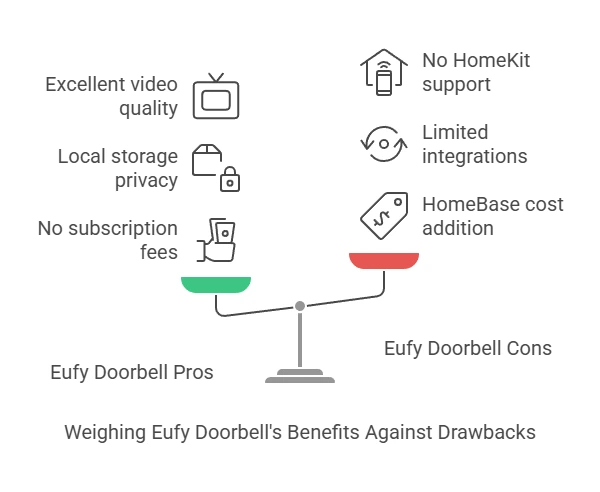
Pros:
- No subscription fees for essential or advanced features
- Local storage enhances privacy and eliminates cloud costs
- Excellent video quality (2K on most models)
- Strong battery life on wireless models (3-6 months)
- Flexible installation options (wired or battery-powered)
- Smart detection features reduce false alerts
- Works with multiple voice assistants (Alexa and Google)
- Good value compared to competitors with subscription models
Cons:
- HomeBase requirement for some models adds to the initial cost
- Limited smart home ecosystem compared to Ring or Nest
- Past security concerns may worry some privacy-conscious users
- No professional monitoring option if that’s something you need
- Limited third-party integrations compared to some competitors
- No official Apple HomeKit support (though workarounds exist)
Where to Buy and Current Pricing
Eufy doorbell cameras are widely available through various retailers:
- Amazon: Usually offers the complete range with competitive pricing
- Best Buy: Good for seeing the devices in person before purchasing
- Walmart: Often has bundle deals with other Eufy security products
- Costco: Frequently offers exclusive bundles at discounted prices
- Eufy’s website: Sometimes runs promotions not available elsewhere
Current pricing as of April 2025:
- Battery-powered models: $100-$200 (often including a HomeBase)
- Wired models: $100-$150
- Premium models with additional features: $150-$250
- Add-on accessories (solar chargers, additional batteries): $30-$60
Keep an eye out for holiday sales, as smart home devices are frequently discounted during Black Friday, Cyber Monday, and Amazon Prime Day events.
Conclusion: Is a Eufy Doorbell Camera Right for You?
After spending extensive time researching and using Eufy doorbell cameras, I believe they offer exceptional value for most homeowners, particularly those who:
- Want to avoid monthly subscription fees
- Value privacy and local data storage
- Need flexible installation options
- Appreciate clear 2K video quality
The subscription-free model alone can save you hundreds of dollars over the life of the device compared to competitors like Ring, Nest, or Arlo.
That said, Eufy might not be the perfect choice if you’re already heavily invested in a specific smart home ecosystem like Ring/Amazon or Nest/Google, where the tighter integration might outweigh the subscription costs.
For most people, though, a Eufy doorbell camera provides the perfect balance of features, quality, and value without the ongoing costs that plague much of the smart home industry.
Ready to take the plunge? I recommend starting with one of their battery-powered models with HomeBase if you’re new to smart doorbells—the flexibility of wireless installation makes it easy to find the perfect placement without committing to permanent wiring.
Have you installed a Eufy doorbell camera or are you considering one? What features matter most to you in a smart doorbell? Share your thoughts in the comments below!